Best Software for HVAC Businesses (2026): The Three Deciders
Every system you’ve ever installed is still out there. On a pad behind a house, up in somebody’s attic, aging on its own schedule toward a tune-up, then a part, then a replacement you’d very much like to be the one to sell. That installed base is the business, and repair calls are how you get to visit it. Software either helps you own the base or it doesn’t, and that, not the scheduling calendar, is what should decide this.
Housecall Pro is the strongest fit for a residential HVAC shop that lives on maintenance agreements. It is the only one of the three with a structured equipment record per unit and a service plan customers renew themselves. But be clear-eyed about the price: those service plans are on the MAX tier, $299/mo billed annually, though MAX includes 8 users. Jobber is cheaper per seat and better at quoting; budget for Grow at $149/mo, not the $29 on the ad. ServiceTitan is where this goes at commercial scale, with warranty tracking and membership accounting the other two do not attempt.
Three questions that actually separate these platforms
Every comparison you’ll read scores these on scheduling, invoicing and mobile apps. All three do all three, competently. Here’s what genuinely differs for an HVAC contractor:
- Does it know what’s on the pad? Whether the software holds a real record of each installed unit (make, model, serial, install date) or just an address.
- Is your maintenance plan a product or a habit? Whether the agreement bills and renews itself, or whether it lives in your head and a recurring calendar entry.
- Can the customer finance the replacement? Which turns out to be the question with the least interesting answer, for a reason worth knowing.
Question 1: does it know what’s on the pad?
This is the one nobody scores, and it’s the one that decides whether your second visit is cheaper than your first.
Housecall Pro has a feature called Property Profile, and it’s more specific than the marketing suggests. Each item stores an item type (A/C, heater, water heater), a display name, make, model, serial number, install date and notes. The example in their own documentation is “downstairs A/C”, which tells you somebody there has thought about houses with two systems. Technicians add and view all of it from the mobile app while they’re standing at the job, which is the only moment anybody will ever actually type in a serial number. An equipment item can also be attached to a service plan, so the agreement is tied to the machine rather than to the address.
ServiceTitan goes further, as you’d expect at its price. Its installed-equipment record carries model, serial and full service history, and it tracks two warranty periods separately: the manufacturer’s and your own labour warranty. If you’ve ever eaten a compressor because nobody could tell you whether the part was still covered, you know exactly what that line is worth. Technicians pull the equipment history up in ServiceTitan Mobile.
Jobber is the weak one here, and it’s worth being precise about why. Jobber’s model is clients who own properties; the property record has custom fields, so you can absolutely create a field called “serial number” and fill it in. What you don’t get is an equipment object, no per-unit record, no install date driving a replacement conversation, no equipment attached to an agreement. For a house with one system it’s fine. For a house with a furnace, a heat pump and a mini-split in the garage, one set of property custom fields starts fighting you.

Question 2: is your maintenance plan a product or a habit?
Both Jobber and Housecall Pro will tell you they handle maintenance agreements, and both are telling the truth. They just mean different things by it.
Housecall Pro sells you a product. You build residential or commercial agreements with services, pricing, visit frequency and customer perks: priority scheduling, discounts, loyalty rewards. Customers pay monthly, quarterly or annually, and the platform automatically generates the recurring jobs from the plan they bought. Then comes the part that matters over five years. Customers can view, renew or upgrade that plan online themselves, so renewal stops being a phone call somebody in your office has to remember to make.
Jobber gives you the habit, well automated. Recurring maintenance visits get scheduled and invoiced automatically, and customers can save a card on file to be charged without anyone chasing them. That covers the mechanics honestly. What’s missing is the plan as an object the customer owns: there’s no tier they picked, nothing for them to log in and renew, nothing to upgrade. It works, but it’s your system, not a product they bought.
One plan trap here, straight off Jobber’s own pricing page: “collect payments automatically” starts on Connect, not Core. A maintenance agreement that still needs someone to send the invoice isn’t automated, so if agreements are your business model, Core isn’t your plan.
ServiceTitan treats memberships as accounting, not just scheduling. Recurring services attach to the service location with start date, recurrence and preferred technician, and it supports deferred revenue with upfront or recurring payment. If you’ve sold three-year agreements and your accountant has opinions about when that money counts as earned, that feature is the reason to be on ServiceTitan.
Question 3: financing, and the difference that isn’t one
We had this one wrong in an earlier version of this page, and most comparisons still have it wrong.
“Housecall Pro has consumer financing” is presented everywhere as a reason to pick it over Jobber. Both run on Wisetack: the same lender, the same application on the customer’s phone. Housecall Pro is the one that publishes the terms: $500 to $65,000, terms up to 120 months, 0–35.9% APR depending on creditworthiness, approvals in minutes, and a flat 3.9% merchant fee per transaction (excluding the 0% APR offers, which cost more). Jobber offers the same integration and doesn’t publish the numbers. Financing is also listed as included on every Housecall Pro plan, not gated behind a tier.
So if you’re choosing between Jobber and Housecall Pro because of financing on a $14,000 system replacement: don’t. It’s a tie. Spend the decision on question 1 or 2 instead. ServiceTitan integrates financing too, on quote-based pricing that makes the comparison moot.
At a glance
| Housecall Pro | Jobber | ServiceTitan | |
|---|---|---|---|
| Best for | Maintenance-agreement shops | Quoting and lean overhead | Commercial and multi-truck |
| Starting price | $59/mo annual ($79 monthly) | $29/mo annual ($49 monthly) | Quote only, per technician |
| Per-unit equipment record | ✅ Type, make, model, serial, install date | ⚠️ Property custom fields only | ✅ Plus manufacturer + labour warranty |
| Users included | 1 · 5 · 8 by tier (+$100 · +$75) | 1 per plan (+$29 each) | Per technician |
| Customer-renewable service plan | ⚠️ Yes — but MAX plan only ($299/mo) | ❌ Recurring jobs + card on file | ✅ Memberships with deferred revenue |
| Good-better-best quoting | ✅ | ⚠️ Optional line items — Grow plan | ✅ Multi-option proposals |
| Consumer financing | ✅ Wisetack, all plans | ✅ Wisetack | ✅ Integrated |
| Card processing | 2.59%–3.49% | 2.7% + $0.30 tap; rest by plan | Not published |
| Free trial | 14 days | 14 days | Demo only |
What an HVAC shop actually pays
The advertised entry prices are real, but they’re not the price of the software an HVAC business needs.
Jobber publishes four plans: Core $49/mo ($29 annual), Connect $139 ($99), Grow $199 ($149), Plus $499 ($399). Now add the HVAC requirements. Automatic payment collection, the thing that makes an agreement run itself, begins on Connect. Optional line items, which is how Jobber does the good-better-best replacement quote, are a Grow feature; it’s listed under Grow on their own pricing page as “upsell services with optional line items”. Want both? You’re on Grow at $149/mo billed annually, five times the headline number.
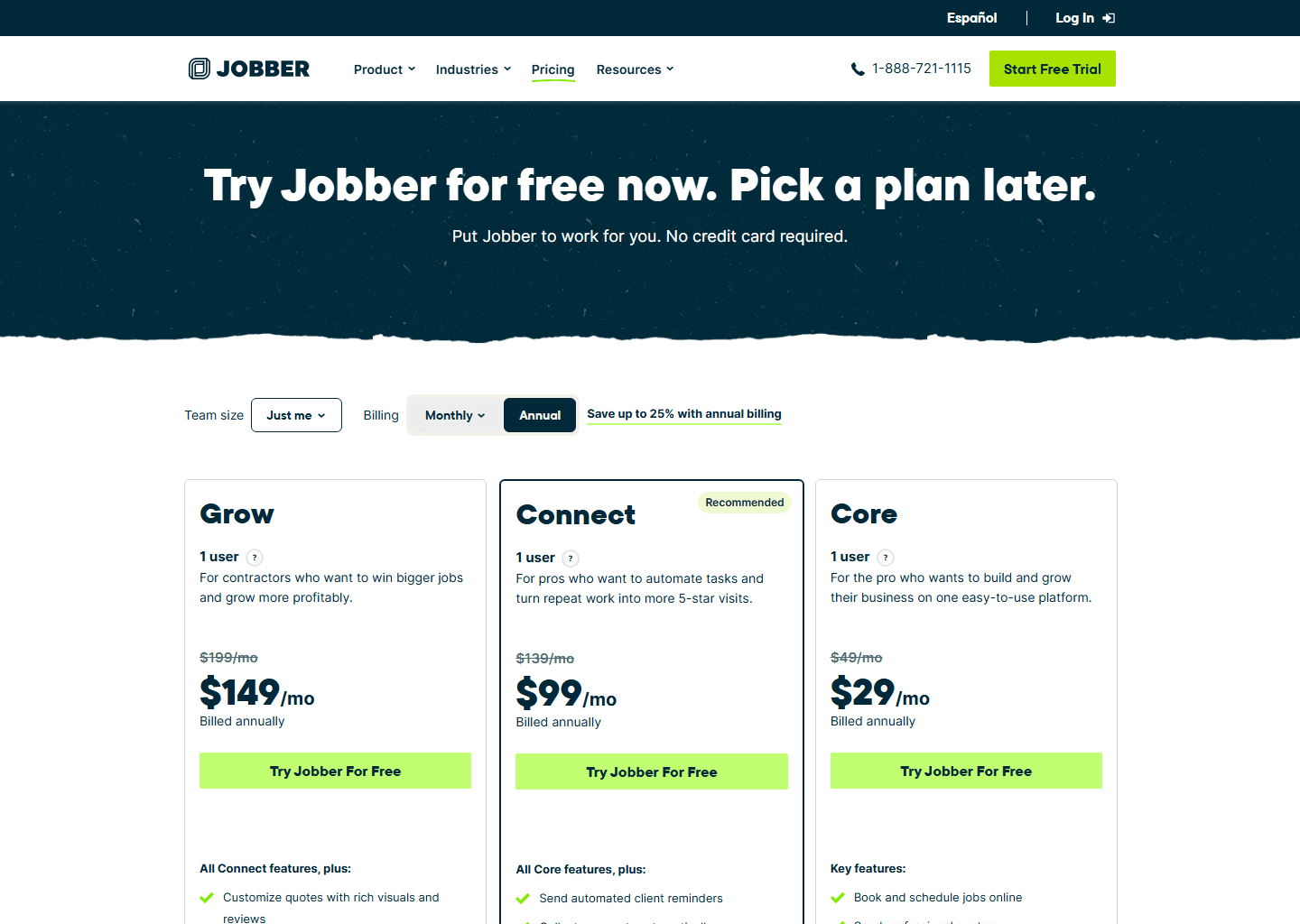
Check which billing option is selected when you open that page yourself. Grow is $199/mo month to month, $169 if you sign twelve months and keep paying monthly, and $149 paid up front for the year — same software, three prices. Watch for a fourth number with “for 12 months” beside it: that’s a first-year promotion, and unlike the other three it expires. Jobber ran one through August 2026; there was none on 6 September 2026.
Housecall Pro is where this gets uncomfortable, and it’s the single most important thing on this page. Its plans run Basic $59/mo annual ($79 monthly), Essentials $149 ($189) and MAX $299 ($329). Recurring Service Plans, the self-renewing maintenance agreement that is the entire reason an HVAC shop would choose Housecall Pro, are listed on the MAX plan only. Flat-rate pricing and the QuickBooks sync start on Essentials. Basic gets you scheduling, invoicing, quotes, review management, a price book and job costing, and none of the agreement machinery.
So the honest number for an HVAC business that wants the maintenance-agreement product is $299/mo billed annually, not $59.
Two things soften that. MAX includes 8 users (extra ones are $75/mo), while Jobber’s plans are quoted per seat from one user upward at $29 each. For a crew of eight the gap narrows a lot, and it reopens the moment you pass eight. For a solo operator it’s brutal. And Housecall Pro’s pricing page now hides its table behind a short quiz, so if you go looking and see no prices, they haven’t been withdrawn. Full tier-by-tier detail in our Housecall Pro pricing guide and the Jobber pricing guide.
ServiceTitan doesn’t publish pricing at all. It’s quoted per technician, with a minimum that puts it out of reach for most residential shops until you’re running several trucks. See our ServiceTitan pricing breakdown for what’s known publicly.
Who should pick which
- Residential HVAC living on maintenance agreements, with a crew: Housecall Pro MAX. At $299/mo including 8 users it is not cheap, but nothing else under enterprise pricing sells the agreement as a product the customer renews. Price it against what one lapsed agreement costs you.
- Solo or two-truck shop watching every dollar: Jobber, budgeted at Grow ($149/mo), accepting that equipment tracking will be a custom field. Housecall Pro Basic at $59 looks tempting, but it has none of the agreement machinery, so you would be buying the cheap tier for the wrong reason.
- Multi-truck, commercial contracts, warranty-heavy work: ServiceTitan.
- Drowning in summer callbacks before you’re ready to switch platforms: fix the phone first. Our guide to AI answering services for contractors covers the cheaper fix.
All three let you try before you commit: two free trials and a demo between them. Use them, rather than deciding from a comparison table.
Quick questions people always ask
Which HVAC software tracks equipment by serial number? Housecall Pro and ServiceTitan both do. Housecall Pro’s Property Profile stores item type, display name, make, model, serial number, install date and notes, and technicians add it from the mobile app on the job. ServiceTitan adds manufacturer and labour warranty periods tracked separately. Jobber has property-level custom fields, which works for one system per house but isn’t a real equipment record.
Can customers sign up for a maintenance plan themselves? With Housecall Pro, yes: customers can view, renew or upgrade their plan online. Note the tier: Recurring Service Plans are listed on the MAX plan ($299/mo billed annually, 8 users included), not on Basic or Essentials. Jobber automates the recurring visits and can charge a saved card, but there’s no customer-facing plan for them to renew. ServiceTitan handles memberships including deferred revenue, aimed at businesses with an accountant asking about it.
Is Housecall Pro better than Jobber for financing? No, and this is worth correcting: both use Wisetack. Housecall Pro publishes the terms ($500–$65,000, up to 120 months, 0–35.9% APR, flat 3.9% merchant fee) and includes financing on every plan; Jobber offers the same integration without publishing figures. Pick on equipment records or service plans instead. See our full Housecall Pro vs Jobber comparison.
What does HVAC software really cost for a small shop? Realistically $99–$149/mo billed annually once you include the features an HVAC business needs, not the $29–$59 entry prices. Add card processing on everything you collect: Housecall Pro publishes 2.59% to 3.49% depending on how the card is taken, and Jobber publishes 2.7% + $0.30 for Tap to Pay while tying the rest to your plan.
Is ServiceTitan worth it for a residential HVAC company? Usually not until you’re running several trucks. It’s quoted per technician with a monthly minimum, and the features that justify it (warranty tracking, membership accounting, commercial agreements) are ones a two-truck shop doesn’t have the volume to exploit yet.
Bottom line
For most residential shops, maintenance agreements are where the money is. If that’s your shop, Housecall Pro is the better platform, because it’s the only one under enterprise pricing where the agreement and the equipment are real objects the customer can see. Jobber is the better value and the better quoting tool, as long as you budget for Grow rather than the advertised entry price. ServiceTitan is the answer once warranties and commercial contracts are a bigger problem than the subscription. And whatever anyone tells you, don’t decide it on financing.
Go deeper: Housecall Pro vs Jobber · best field service management software.
Pricing verified on the vendors’ own sites on 29 July 2026. Some links are affiliate links. See our affiliate disclosure. Screenshots belong to their respective owners.