Jobber Pricing (2026): Every Plan, and the Price You'll Actually Pay
Jobber publishes its prices, which in this market makes it the exception: no quiz, no “book a demo to find out.” What catches people is that every plan has three prices, not two, and the page shows you two of them at once with one crossed out.
Jobber's recurring annual prices are Core $29/mo, Connect $99, Grow $149, Plus $399. Billed monthly they're $49, $139, $199 and $499. Each plan includes one user; extra seats are $29/mo. Most solo operators want Core. The moment you need payments to collect themselves you're on Connect, and good-better-best quoting puts you on Grow.
Every plan has three prices, not two
Almost every comparison of this software, ours included until recently, gives you two numbers per plan: monthly and annual. Jobber’s page has a third, and it sits between them. Open the Billing control and “Monthly” expands into two options:
| How you pay | Core | Connect | Grow | Plus |
|---|---|---|---|---|
| Month to month, no commitment | $49/mo | $139/mo | $199/mo | $499/mo |
| Monthly, twelve months signed | $39/mo | $119/mo | $169/mo | $439/mo |
| Annual, paid up front | $29/mo | $99/mo | $149/mo | $399/mo |
The middle row is the one nobody quotes, and for a lot of businesses it is the right one. It gives back most of the annual discount without asking for the year up front: Core at $39 is $10 a month more than prepaying, against $348 you don’t have to find on day one.
What you are buying with the lower number is the commitment, not the product. The software is identical in all three rows.
The crossed-out number is not a discount
Whichever option you pick, each card shows a struck-through price above the one you’d pay. On Grow it reads $199 crossed out, then $149/mo. That is not a “was” price and it is not an introductory rate: $199 is simply the no-commitment price, shown next to the option you selected.
The distinction matters because it changes what happens in month thirteen. A promotional rate ends and your bill goes up. These don’t: $149 is what Grow costs for as long as you keep renewing annually.
Jobber does run genuine first-year promotions on top of this, which is why the confusion is easy. We saw one in August 2026: Core at $21 against $29, Connect $70 against $99, Grow $105 against $149, with “for 12 months, then $29/mo” in the small print and an offer deadline of 31 August. We checked again on 6 September 2026 and there was no promotion on the page. So look for the words “for 12 months” before you assume the low number is permanent, and don’t assume it’s there.
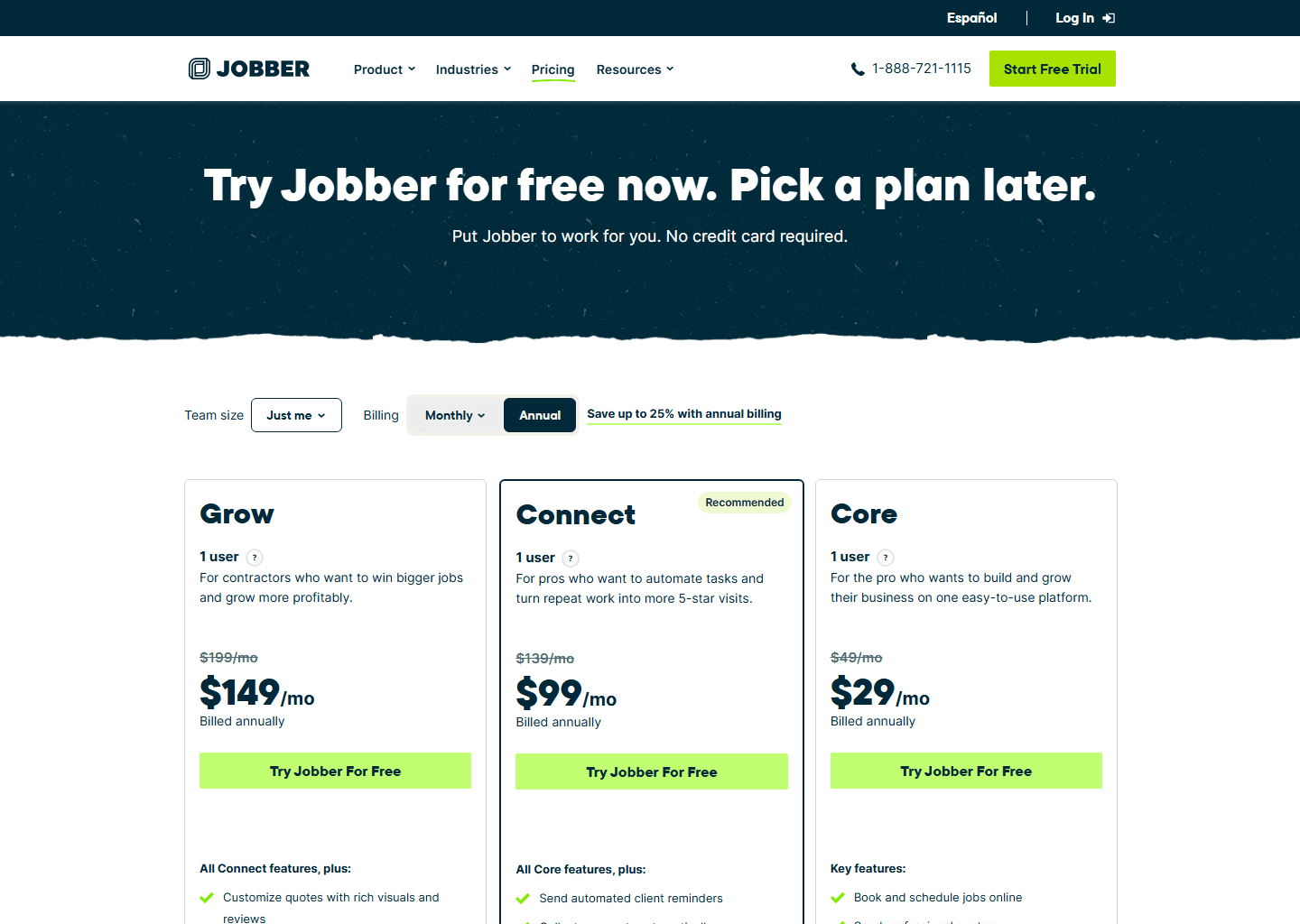
The price list
| Plan | Billed monthly | Billed annually | Users included |
|---|---|---|---|
| Core | $49/mo | $29/mo | 1 |
| Connect | $139/mo | $99/mo | 1 · 5 users $149/mo · 10 users $229/mo · 15 users $299/mo (annual) |
| Grow | $199/mo | $149/mo | 1 · 5 users $229/mo · 10 users $299/mo · 15 users $399/mo (annual) |
| Plus | $499/mo | $399/mo | 5 · 10 users $449/mo · 15 users $529/mo (annual) · sales-led |
Additional users are $29/mo each on every plan, and annual billing saves roughly 25% to 30%. The 14-day free trial runs on the fully loaded Grow plan and needs no card.
The page opens on “Just me”, and both the price and the seat count move with the team-size selector, so what you’re reading is a ladder. Billed annually, the recurring rungs are:
| Seats | Connect | Grow | Plus |
|---|---|---|---|
| 1 | $99/mo | $149/mo | — |
| 5 | $149/mo | $229/mo | $399/mo |
| 10 | $229/mo | $299/mo | $449/mo |
| 15 | $299/mo | $399/mo | $529/mo |
Past fifteen the price disappears and the button becomes “Contact Sales”. The bundles are far better value than adding seats at $29 each: ten users on Grow is $299 as a bundle against $410 buying them one by one. They’re also easy to miss, because you have to go looking for them.
What each plan actually unlocks
Core. $29/mo annual. Book and schedule jobs online, send quotes, send invoices and take online payments. You also get a professional website, built-in reporting and 100+ integrations through the app marketplace.
That’s a real tool, and a solo operator can run a whole business on it. What Core can’t do is anything automatic.
Connect. $99/mo annual. Everything in Core, plus:
- Collect payments automatically: the saved card gets charged without anyone chasing it
- Automated client reminders
- Automated quote and invoice follow-ups
- QuickBooks Online sync
- Job checklists and time and expense tracking
- Route optimization (confirmed on Connect, Grow and Plus in Jobber’s own help centre)
On Connect, Jobber stops being a notebook and starts being a system. If you run recurring or maintenance work, this is your floor: an agreement that still needs a human to send the invoice isn’t automated.
Grow. $149/mo annual. Everything in Connect, plus:
- Optional line items, the good-better-best quote where the customer taps to add the extras
- Quotes with rich visuals and reviews
- Automatic time tracking and job costing
- Two-way SMS
- Custom workflow automations
If quoting is how you win work, and in most trades it is, Grow is the plan you’re actually shopping for. Optional line items alone put plenty of contractors on this tier.
Plus. $399/mo annual, 5 users. The top tier, aimed at established teams; it appears on the pricing page once you set a larger team size.
The add-ons, priced in the open
This is where Jobber does something its competitors don’t: it publishes add-on prices instead of routing you to sales.
| Add-on | Price | What it does |
|---|---|---|
| Jobber Receptionist | $29/mo | AI answers calls and texts around the clock, takes requests, books jobs |
| Pipeline | $49/mo | Keeps requests and quotes in one view so leads don’t go cold |
| Marketing Suite | $79/mo | A marketing plan built around your business: what to promote and when |
Receptionist at $29/mo is the one to look at first, particularly in emergency trades. Third-party articles have quoted $99 for it, which is wrong and the kind of error that makes a genuinely cheap add-on look unaffordable. Catch one extra job a year and it has paid for itself several times over. We compared it against the alternatives in our guide to AI answering services for contractors.
The fees that aren’t the subscription
- Card processing, and this is the one figure the pricing page doesn’t carry. Jobber’s help centre says your rate is determined by the plan you’re on and shows it inside your account. Published for everyone: Tap to Pay at 2.7% plus 30 cents, 0.2% off if you take the card on the physical reader, 1% for ACH, and another 1% if you want the payout instantly. On $40,000/mo of card revenue, the published Tap to Pay rate alone is $1,080 a month: many times the software bill, and the number nobody compares.
- Extra users: $29/mo each, on every plan.
- Monthly billing costs roughly 25% to 30% more than annual, and signing twelve months while still paying monthly gets you about half of that back.
- A first-year promotion, if one is running. It’s a real discount and it ends; the rates in this article don’t.
Which plan should you actually pick?
- Solo, quoting occasionally, chasing your own invoices: Core, $29/mo. Genuinely enough. If you’re only just leaving the spreadsheet behind, start here and stay month to month until the first month-end close is done.
- Recurring or maintenance work of any kind: Connect, $99/mo. Automatic payment collection is the whole point; below it you’re doing the admin by hand.
- Quoting is how you win: Grow, $149/mo, for optional line items and job costing. Most trades that sell installs or replacements end up here.
- Five or more on the team: use the bundles. Grow with 10 users is $299/mo against $410 for Grow plus nine seats at $29 each.
- Everyone: the trial runs on Grow, so use the 14 days to find out whether you actually touch the Grow features before you pay for them.
How it compares to Housecall Pro
The line everyone repeats is that Jobber costs half what Housecall Pro does. At one user that’s true: $29 against $59. It stops being true as you hire, because Housecall Pro bundles seats into its tiers while Jobber sells them one at a time:
| Team size | Jobber | Housecall Pro |
|---|---|---|
| 1 user | Core, $29/mo | Basic, $59/mo |
| 5 users | Connect, $149/mo | Essentials, $149/mo |
| 10 users | Grow, $299/mo · Connect, $229/mo | MAX, $299/mo (8 users) |
Billed annually. At five users it’s a dead heat; past eight, Jobber’s $29 marginal seat beats Housecall Pro’s $75 by better than two to one. Where Jobber genuinely wins is quoting; where it loses is equipment records and maintenance agreements, which is the whole argument in Housecall Pro vs Jobber and our Housecall Pro pricing guide.
Quick questions people always ask
How much does Jobber cost per month? Core $49, Connect $139, Grow $199 and Plus $499 billed monthly; $29, $99, $149 and $399 billed annually. Each plan includes one user except Plus, which includes five. Extra users are $29/mo.
Why is the price on Jobber’s site lower than the price here? Check which billing option is selected first: the same plan shows three prices depending on whether you commit. If it’s lower than all three, look for the words “for 12 months” — that’s a first-year promotion, and it ends. There wasn’t one running when we last checked on 6 September 2026.
Which plan do I need for QuickBooks? Connect or above. The QuickBooks Online sync isn’t on Core. It’s one-directional, Jobber to QuickBooks.
Which plan has good-better-best quotes? Grow. Optional line items (the add-ons a customer taps to approve) are listed under Grow on Jobber’s pricing page. It’s the most common reason a small shop ends up paying $149 rather than $29.
Is Jobber cheaper than Housecall Pro? At one user, yes, by half. At five users they’re both $149/mo billed annually. Compare at your real headcount.
Is there a contract? Only if you want the discount. Month to month commits you to nothing; the cheaper two options both sign you up for twelve months, one paid monthly and one paid up front. The 14-day trial takes no card either way.
Bottom line
Jobber’s honest prices are $29, $99, $149 and $399 a month billed annually. Which one you need comes down to how much you want happening without you: Core if the answer is nothing, Connect once payments and follow-ups have to collect themselves, Grow if the quote has to do the selling. Then look past the subscription at what the processor takes on every card, because on most statements that’s the bigger number — and it’s the one figure the pricing page won’t give you, so open the payments screen inside your account and read your own rate before you commit.
Read next: Jobber review · Housecall Pro vs Jobber · Jobber alternatives.
Pricing verified on getjobber.com on 6 September 2026. Some links are affiliate links — see our affiliate disclosure. Screenshots belong to their respective owners.