Jobber vs Housecall Pro vs ServiceTitan (2026): Seat Count Decides
At five seats Jobber and Housecall Pro cost exactly the same, $149 a month each, to the dollar. Drop back to one person and Jobber costs half; go up to fifteen and the gap has opened again in Jobber’s favour. That’s not the ranking you get from the usual sorting, which files these three by company size: Jobber for small, Housecall Pro for mid, ServiceTitan for big. Tidy, and wrong in the one place it costs money. The price ranking between Jobber and Housecall Pro flips three times as you add people, so the useful question isn’t which tool is cheaper. It’s cheaper at what headcount, and what the tier you land on actually buys.
Price your team, not the software. Jobber is dramatically cheaper solo and cheapest again past ten seats, because its bundles hold while Housecall Pro starts charging per head. Housecall Pro ties on price at five and wins on maintenance agreements. ServiceTitan publishes nothing at all, so it never enters a price comparison. You go there for capability, not value.
The seat-count ladder
All figures below are the recurring annual-billing rate, read off the vendors’ own pricing pages. Two things make this table harder to build than it looks, and they’re why most comparisons get it wrong: Jobber’s price and its included seats both change with a team-size selector that opens on “Just me”, and Housecall Pro bundles seats into the tier rather than selling them one at a time.
| Team size | Jobber | Housecall Pro | ServiceTitan |
|---|---|---|---|
| 1 | $29 Core | $59 Basic | Not published |
| 5 | $149 Connect · $229 Grow | $149 Essentials | Not published |
| 10 | $229 Connect · $299 Grow | $449 MAX (8 seats + 2 more) | Not published |
| 15 | $299 Connect · $399 Grow | $824 MAX (8 seats + 7 more) | Not published |
Housecall Pro’s MAX tier includes eight seats; above that each extra is $75/mo, and Essentials charges $100 for the same thing. So ten people is MAX plus two more, and fifteen is MAX plus seven, which is where the compounding shows up. Jobber charges $29/mo per extra user, but its published bundles already cover you to fifteen.
- At one seat, it isn’t close. $29 against $59 is a hundred percent difference on the same job.
- At five they’re identical, both landing on $149, so price stops being the tiebreaker and the feature question below takes over entirely.
- At ten, Jobber is ahead by $150/mo, and at fifteen by $425/mo. Not because Jobber got cheaper, but because Housecall Pro started charging per head, and a head there costs more than double what it costs on Jobber.
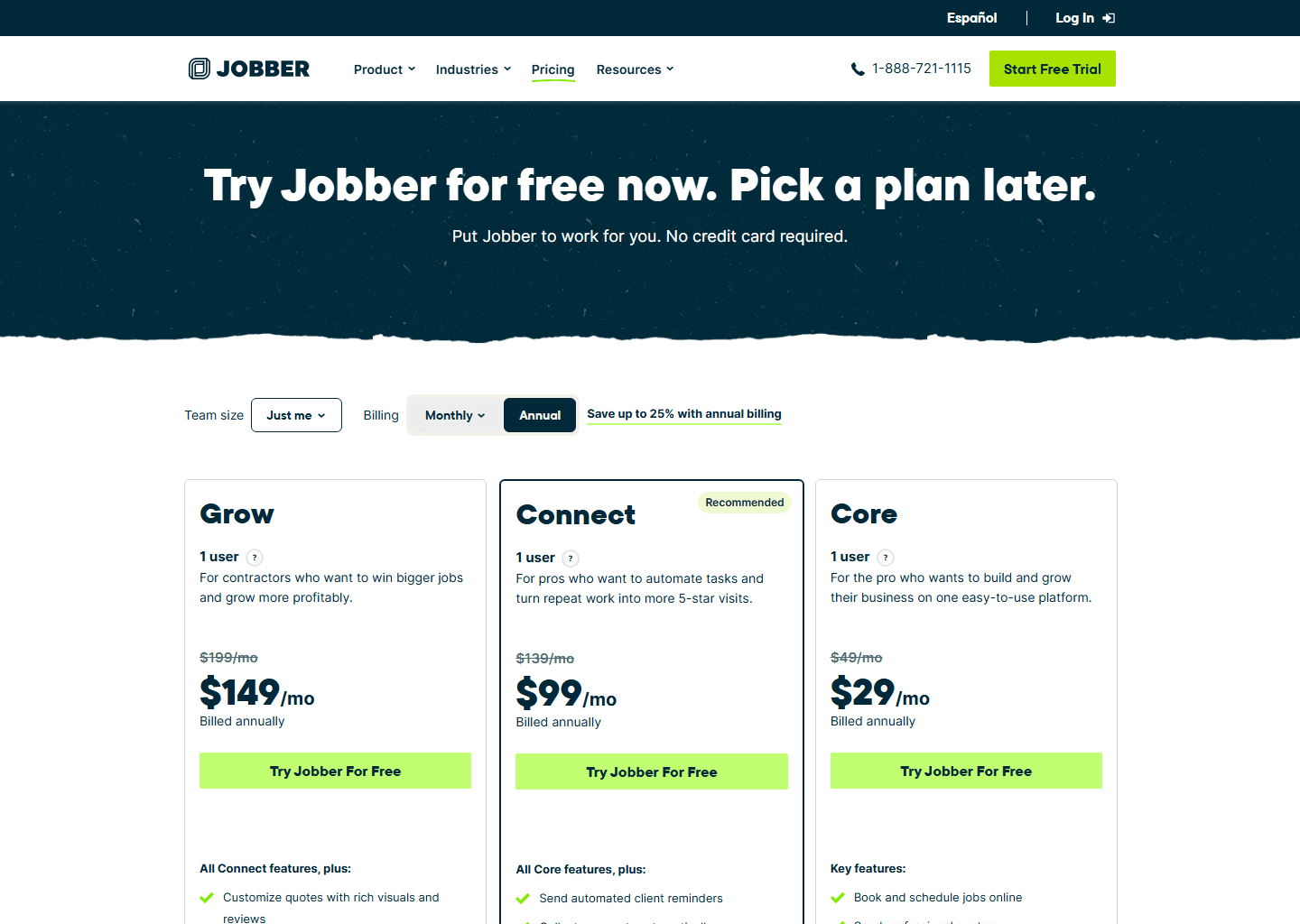
One warning that applies to every Jobber figure here. The number on screen depends on a billing control with three settings, not two: month to month, twelve months paid monthly, or twelve months paid up front. Every Jobber figure in this article is the third one, the annual rate. The crossed-out price beside it on the page is the first one. Our Jobber pricing breakdown walks the whole selector.
$149 doesn’t mean $149
The five-seat tie is the row worth slowing down on: two identical prices buy noticeably different software.
Jobber Connect at that price unlocks automatic payment collection, automated reminders and follow-ups, QuickBooks Online sync, route optimization, and checklists with time and expense tracking. The centre of gravity is getting paid without chasing.
Housecall Pro Essentials unlocks flat-rate pricing, QuickBooks Online sync, routes, employee GPS tracking, checklist automations, photo reports and commissions. The centre of gravity is knowing what your crew is doing, though Jobber Connect matches it on GPS. Waypoints log where each person clocks in, out and completes a visit, and live vehicle tracking is available through FleetSharp if you fit the devices. The real gap is the price book. Housecall Pro sells a flat-rate, task-priced book; Jobber gives you a products-and-services line-item list, with tap-to-upgrade optional line items only from Grow.
Move up to the $299 row and the split gets sharper. This is the row that decides it for a lot of businesses:
- Jobber Grow adds optional line items (good-better-best quotes a customer can tap to upgrade themselves), plus job costing, two-way SMS and custom workflow automations.
- Housecall Pro MAX adds Recurring Service Plans, which is to say maintenance agreements, along with route optimization, the sales proposal tool and open API access.
If you sell annual maintenance contracts, that’s the whole decision in one line: Housecall Pro has the object for it at MAX and Jobber doesn’t have one at any tier. If you sell one-off jobs and want the quote to upsell itself, it’s the other way round. See Housecall Pro vs Jobber for that pair on its own.
When you leave both
ServiceTitan isn’t the expensive version of these two. It’s a different category, and it’s worth naming exactly what forces the move, because “we got bigger” isn’t it. These are the capabilities with no equivalent in either tool at any price:
- Installed-equipment records held by model and serial, with the manufacturer warranty and your own labour warranty tracked separately. For HVAC and commercial refrigeration this is usually the one that ends the argument.
- Memberships with deferred revenue: a year of maintenance paid in January doesn’t all land in January’s profit. Housecall Pro’s Service Plans automate the visits and the billing; they don’t do the accounting.
- Multi-option proposals and enterprise-grade job costing and reporting built for multiple crews.
What it costs is a genuine unknown, and we’re not going to pretend otherwise. ServiceTitan publishes no pricing at all: it’s quoted per technician with a monthly minimum, and there’s no free trial, only a demo. Third-party figures circulate freely and contradict each other by thousands of dollars a month, so printing a range would be inventing a number with extra steps. Our ServiceTitan pricing guide covers what can and can’t be established, and Jobber vs ServiceTitan and Housecall Pro vs ServiceTitan take those pairings individually.
What I like, what to watch
What I like about Jobber
- Half the price at one seat
- Bundles hold to 15 users
- Best good-better-best quoting here
- 14-day trial, no card
What to watch with Jobber
- No maintenance-agreement object
- No equipment or warranty records
- Headline price is often year-one only
- Seat prices hide behind a selector
What I like about Housecall Pro
- Recurring Service Plans at MAX
- GPS and flat-rate pricing at $149
- Card processing from 2.59%
- 14-day trial, no card
What to watch with Housecall Pro
- $75/mo per seat above MAX's eight
- Twice Jobber's price for a solo operator
- Several add-ons carry no public price
- Prices sit below a four-step quiz
What I like about ServiceTitan
- Equipment and warranty records
- Memberships with deferred revenue
- Reporting built for multiple crews
- Multi-option proposals
What to watch with ServiceTitan
- No published price, anywhere
- No free trial, demo only
- Add-on products also unpriced
- Implementation, not an install
So which one?
- Solo or two people: Jobber, on price alone. Nothing else here comes close at that size.
- Around five, selling one-off jobs: either, at the same price. Take Jobber for the quoting.
- Around five, selling maintenance contracts: Housecall Pro, and go to MAX for Service Plans.
- Ten to fifteen, no contracts: Jobber. The bundles are the cheaper shape by a clear margin.
- You need warranties tracked per unit, or membership revenue recognised properly: ServiceTitan, and budget for a real implementation.
If you’re weighing these three at all, you’re almost certainly choosing between the first two. Our best field service management software guide puts them next to the rest of the market.
Quick questions people always ask
Is Housecall Pro more expensive than Jobber? It depends entirely on headcount. Solo, it’s twice the price: $59 against $29. At five seats they’re both $149. At ten and above Jobber pulls ahead again, because Housecall Pro adds $75/mo per seat over MAX’s eight against Jobber’s $29.
How much does ServiceTitan cost? Nobody outside a sales call knows. It’s per technician with a monthly minimum and no published figure. We won’t repeat the third-party estimates because they disagree with each other by thousands a month.
Which one handles maintenance agreements? Housecall Pro, on the MAX tier, through Recurring Service Plans. Jobber has no equivalent at any tier: it can schedule the visits, but there’s no agreement object behind them. ServiceTitan goes further again and handles the deferred revenue.
Can I try them before paying? Jobber and Housecall Pro both give you 14 days without a card. ServiceTitan doesn’t do trials at all; it’s a demo and a quote.
Do these prices include payment processing? No, that’s separate on all three, and only one of them gives you the whole picture up front. Housecall Pro publishes its card rates by method, 2.59%–3.49%, with ACH at 1%. Jobber ties your card rate to the plan you’re on and shows it inside your account; the figure it publishes to everyone is Tap to Pay at 2.7% + $0.30, with ACH at 1%. ServiceTitan doesn’t publish its rates.
Bottom line
Pick the tier your headcount actually lands on, not the brand you’ve heard of. Jobber is the obvious answer solo, and the cheaper shape again from ten seats up. At five, Housecall Pro matches it exactly, and it takes the decision outright if you sell maintenance agreements. ServiceTitan is a different purchase entirely: you move there when a specific capability is costing you money, not when you feel big enough.
Going deeper on one pair? Read Housecall Pro vs Jobber, Jobber vs ServiceTitan or Housecall Pro vs ServiceTitan. Prices for each are broken down in our Housecall Pro pricing guide.
Pricing and features verified on the vendors’ own sites on 29 July 2026. Some links are affiliate links. See our affiliate disclosure. Screenshots are from the vendors’ official websites and belong to their respective owners.