When to Switch From Spreadsheets to Field Service Software (2026)
Every guide about leaving spreadsheets asks how big your team is. Your spreadsheet has never once cared how many people you employ. It falls over on the number of rows you add in a week, and that is the one number nobody in this category puts a price on.
Switch when a week of work stops fitting in your head, not when you hire. If you clean houses, ZenMaid Starter at $19/mo plus $4 per active cleaner is the cheapest honest exit. Otherwise Jobber Core at $29/mo billed annually takes over the schedule and the invoices, and Housecall Pro Basic at $59/mo takes over the profit maths as well. Budget for a year, because that is how the cheap prices are sold.
Team size is the wrong trigger
Look at how this category prices itself. Jobber Core is one user. Housecall Pro Essentials bundles five. ServiceTitan is quoted per technician. ZenMaid charges a base fee plus a sum per active cleaner. Every price tag has a headcount in it, so every comparison you read is organised around headcount too.
Now think about what actually goes wrong in the spreadsheet. Nobody updates it from a van. Two people edit the same row. A job gets moved by phone on Tuesday and the sheet still says Thursday. A quote goes out with last season’s price because the price list lives on a different tab that only you maintain. Not one of those problems is caused by hiring. They are all caused by doing more jobs than one person can hold in their head between the van and the kitchen table.
That mismatch is why the advice you find is so useless. A solo window cleaner doing eight small jobs a day has an unworkable spreadsheet. A three-person crew doing one bathroom refit a week has a perfectly fine one. Headcount tells you which plan to buy. It tells you almost nothing about when to buy it.
The one published number worth borrowing
ZenMaid is the one vendor in our pricing tracker that prices on volume as well as on people, and it has put a figure on the line: Starter covers up to 40 appointments a month, and Pro makes them unlimited.
Its own pricing FAQ is unusually blunt about what happens at that line. Hit 40 and the app stops you adding another appointment for the rest of that month, and sends you to the billing screen to upgrade. That is a hard stop in the middle of a working month, not a gentle overage charge.
Forty appointments is roughly two a day, five days a week. Borrow the number even if you never touch ZenMaid, because it is the only published answer to “how busy is too busy for the small version” anywhere in our pricing tracker. Count last month’s jobs. If you were comfortably under 40, your spreadsheet is probably still fine and the money is better spent elsewhere. If you were over it, you have been running a business on a tool that was designed for a shopping list.
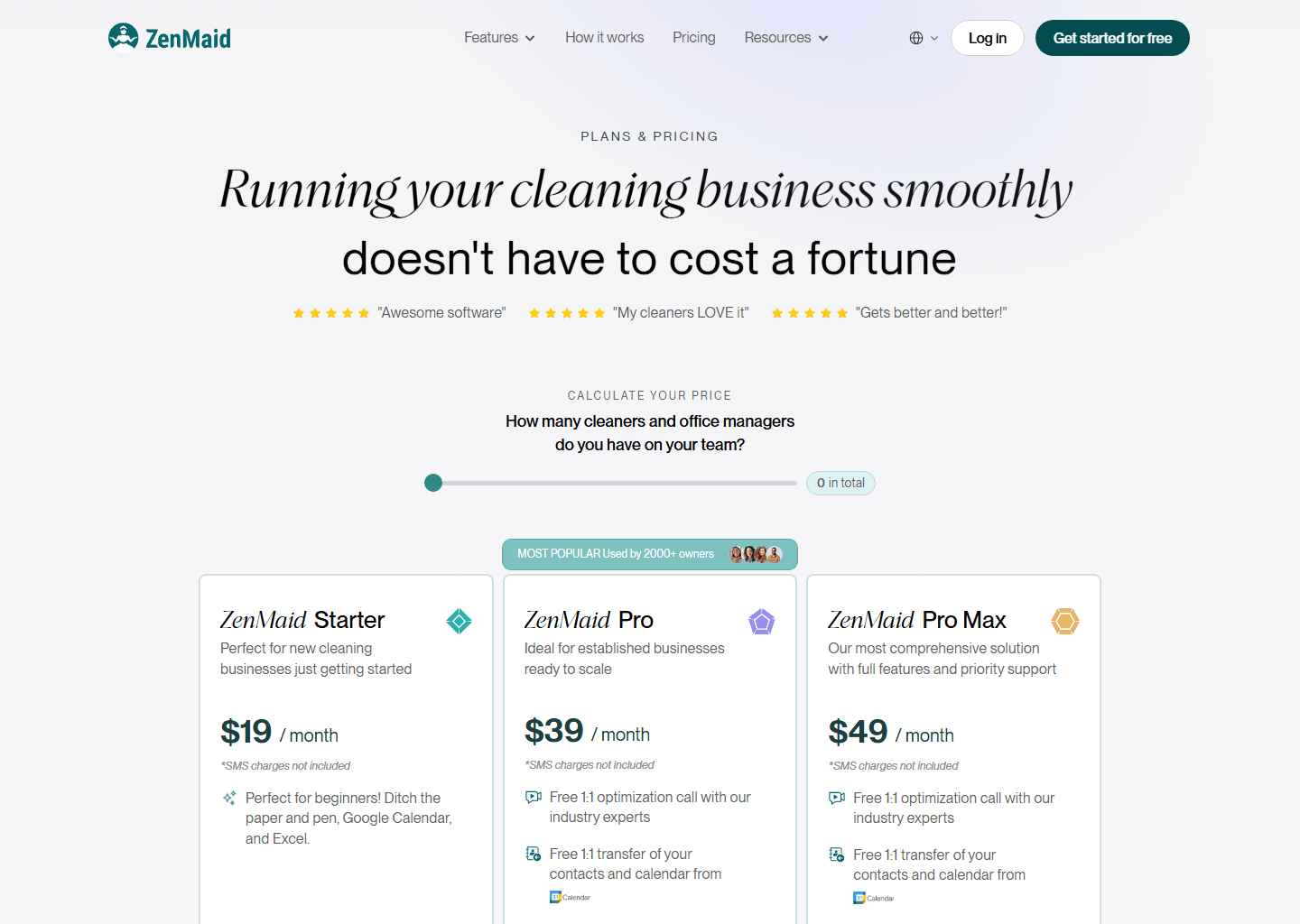
For a one-person cleaning business, Starter with a single active cleaner comes to $23/mo, or $276 a year, and it will tell you itself when you have outgrown it. The rest of the trade-offs are in our ZenMaid review.
Which tabs the entry plan actually replaces
A service business run on spreadsheets usually has four things going on, whether or not they are four literal tabs: a schedule, a customer list, a quote-and-invoice log, and a profit calculation that lives half in a sheet and half in your head.
The entry plans take over the first three. Jobber Core covers online booking and scheduling, quotes, invoices and online payments, and built-in reporting, all at one user. Housecall Pro Basic covers scheduling, dispatching and online booking, then quotes, proposals, invoices and payments, plus review management. Move to either and the schedule tab and the invoice log are gone on day one, which is most of the daily pain.
The fourth one is where the two platforms part company, and it is the reason a spreadsheet leaver should not just buy the cheaper sticker.
The profit tab has a price on it
Job costing, the thing that tells you what a finished job actually earned after materials and your own hours, comes with Housecall Pro Basic at $59/mo along with a price book. On Jobber it arrives on Grow at $149/mo billed annually, with automatic time tracking alongside it.
So a spreadsheet user has to answer one question before choosing: is the profit tab the reason you are leaving? If it is, Jobber Core at $29 keeps you in the spreadsheet for exactly the calculation you wanted to stop doing, and Housecall Pro’s entry plan retires it. If your margins are simple and you already know them, Core does everything else for $30 a month less. We worked the same fork through in detail for one-person businesses.
The bookkeeping tab has a price on it too, and it is the same shape. QuickBooks Online sync starts a tier up on both platforms, at Jobber Connect and Housecall Pro Essentials, so month-end double entry survives the move to the cheapest plan on either. Whether that upgrade earns its money at your invoice volume is a real calculation, and we did it in when the QuickBooks upgrade pays off.
Fourteen days is shorter than a month
Jobber, Housecall Pro and ZenMaid all give you 14 days, and all three start without a card. ServiceTitan works differently: it is quoted per technician and sold through a demo, so a business coming off spreadsheets is choosing it on someone else’s screen. Our ServiceTitan pricing guide covers what can be verified about the number.
Fourteen days sounds generous until you notice it is half a billing cycle. The test that decides whether the switch worked is a month-end: invoices out, payments chased, numbers reconciled, the week where the spreadsheet used to eat a Sunday. Start a trial on the 1st and it expires on the 14th, before you have closed anything. You will have evaluated the calendar and very little else.
So time it. Start the trial around the 20th and a real month-end falls inside the window, with a few days on the far side to see what the software did with it. Put genuine work through it: a real quote, a real invoice, a real card payment. Those are the three things you will repeat a few hundred times a year, and they are what you are actually buying.
What year one really costs
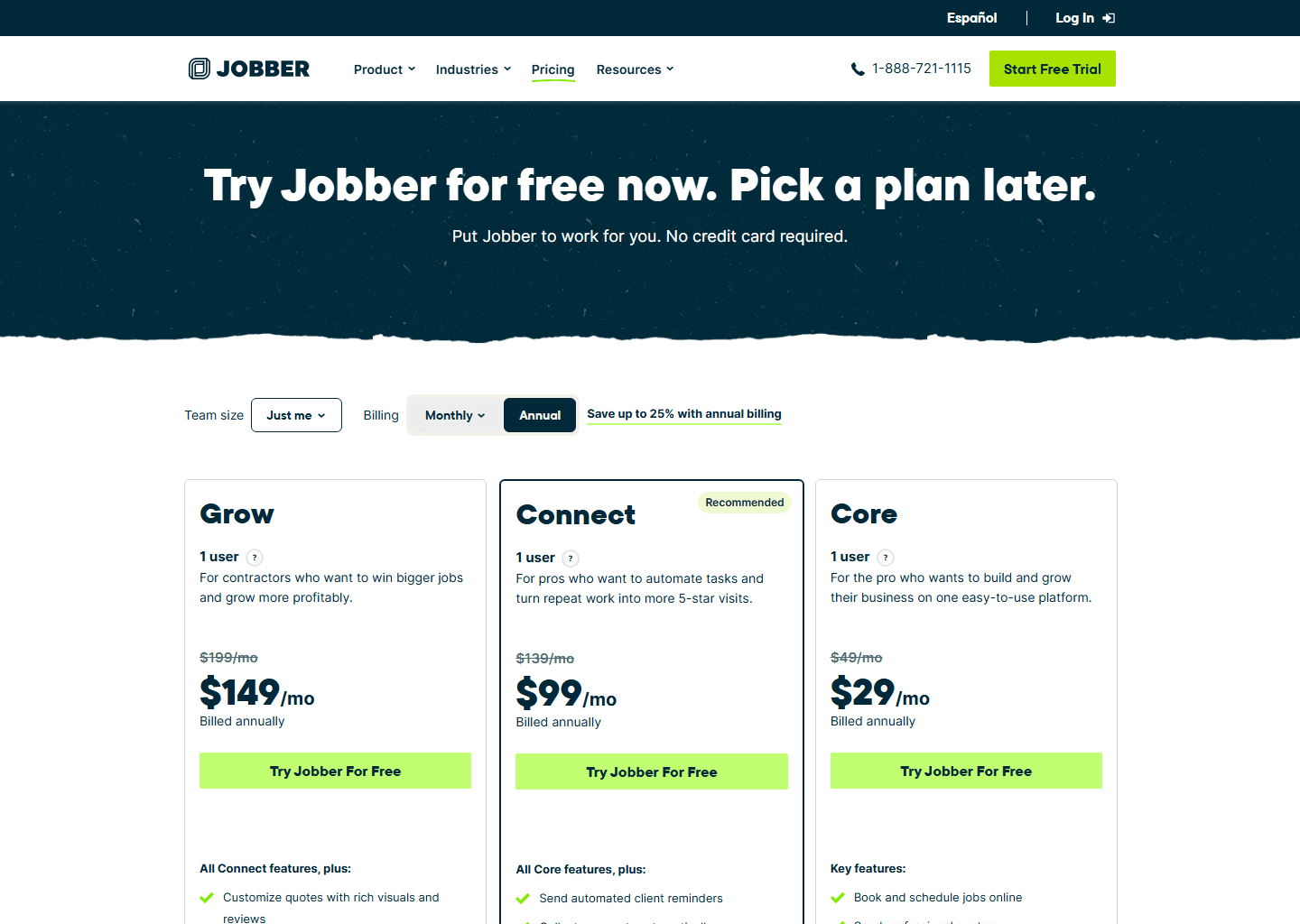
The cheap prices everyone quotes, $29 and $59, are annual prices. You get them by committing twelve months to a tool you have used for two weeks. Twelve months of Jobber Core is $348 and twelve months of Housecall Pro Basic is $708. Paying month to month is $49 and $79 instead, and for a business making its first move off spreadsheets that flexibility is usually worth the premium for a couple of months.
Read Jobber’s pricing page carefully while you are there, because it shows two numbers. On the day we checked, Core led with $21/mo in large type, with “for 12 months, then $29/mo” underneath. The first year is a promotion; the second year is the price. Budget from the small print.
Then there is the cost nobody invoices you for: the weekend spent moving customers across, and the month where you run both systems because you do not trust the new one yet. Plan for that month. It is the reason most switches stall, and it is much easier in January than in June. For the full picture of what these platforms cost once card fees are counted, see what field service software really costs.
Quick questions people always ask
How many jobs a month means I have outgrown a spreadsheet? There is one published figure to anchor on, and it is ZenMaid’s: 40 appointments a month is where its Starter plan stops. That is about two a day. Below it, a well-kept sheet is defensible. Above it, you are spending more time maintaining the sheet than the software would cost.
Can I keep the spreadsheet as a backup? For a month, yes, and you probably should. Run both through one full month-end, then pick. What you must avoid is running both for a quarter, because the moment the two disagree you stop trusting either, and people go back to the sheet they know.
Is the cheapest plan really enough coming from spreadsheets? Usually. Quoting, scheduling, invoicing and taking payment is the entire loop of a small service business, and both entry plans do all four. The two things that legitimately push a switcher one tier up are automatic invoice chasing and accounting sync, and both live above the entry plan on either platform.
What if my problem is really the bookkeeping? Then price the tier that includes QuickBooks sync before you fall in love with the entry price, because that is Connect on Jobber and Essentials on Housecall Pro. Our pricing guide for Jobber lays the ladder out plan by plan.
Bottom line
Count last month’s jobs, not last month’s payroll. Around 40 a month is where the one published volume line in our pricing tracker sits, and it is a better trigger than any advice built on team size. If you clean houses, start at ZenMaid Starter, $19 plus $4 a cleaner, and let it tell you when to move up. If you want the profit maths to leave the spreadsheet with everything else, Housecall Pro Basic at $59 is the plan that does it. If you already know your margins and just want the daily chaos to stop, Jobber Core at $29 is the cheapest complete exit. And whichever you trial, start it around the 20th so a month-end lands inside the fortnight. That is the week that tells you the truth.
More context: best field service management software · field service software for solo operators · best scheduling software for home services · what field service software really costs.
Pricing verified on the vendors’ own sites on 24 August 2026. Some links are affiliate links — see our affiliate disclosure. Screenshots are from the vendors’ official websites and belong to their respective owners.