QuickBooks Sync: When the Plan Upgrade Actually Pays Off (2026)
Month end, and someone is reading invoice numbers off one screen and typing them into another. Every one of those invoices already exists in both systems by the time they’re done.
Jobber and Housecall Pro both sell a way out of that, and neither generalist puts it on its cheapest plan. So the sync carries a price, and that price is the gap between two plans rather than a line item anyone shows you. Working it out is on you.
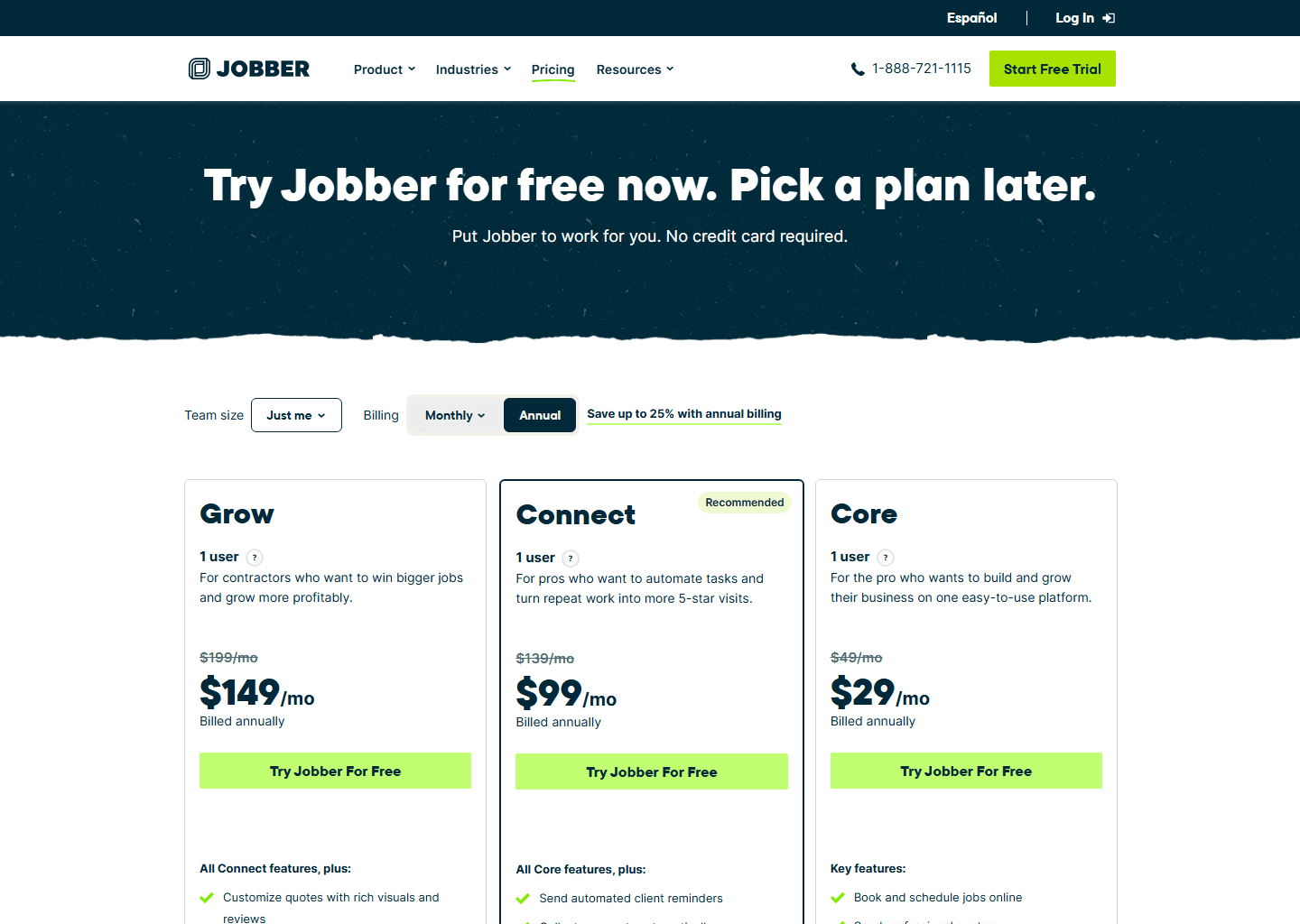
Upgrading for QuickBooks sync costs real money: roughly $70–$90/mo more on Jobber and $90–$110/mo more on Housecall Pro, depending on annual or monthly billing. What that buys is a feature that only pushes invoices one direction, into QuickBooks, and never back. If you're hand-entering fewer than a couple dozen invoices a month, that upgrade may not be paying for itself yet. If your bookkeeper is already drowning in re-typed invoices, it pays for itself fast. You just won't find that threshold on either vendor's website.
Everyone sells the sync as a reason to upgrade
Every field service platform in this category treats QuickBooks sync as a plan-tier carrot: pay more, stop retyping invoices. The pitch skips two things. The sync is a modest feature that moves finished transactions in one direction and does nothing else, and manual entry, tedious as it is, costs nothing. So the decision is arithmetic rather than preference: does your invoice volume cover what the plan jump costs?
What the upgrade actually costs, plan to plan
Here’s the real delta, not just the sticker price of the tier you’d land on:
| Jobber: Core → Connect | Housecall Pro: Basic → Essentials | |
|---|---|---|
| Billed annually | $29/mo → $99/mo (+$70/mo) | $59/mo → $149/mo (+$90/mo) |
| Billed monthly | $49/mo → $139/mo (+$90/mo) | $79/mo → $189/mo (+$110/mo) |
That’s not a rounding error. It’s the price of a single feature, dressed up inside a plan jump that also brings route optimization, automated payment collection, and other things you may or may not need yet. Full plan breakdowns: Jobber pricing and Housecall Pro pricing cover everything else those tiers unlock.
There’s no honest, universal breakeven number to publish here. Bookkeeping rates and minutes-per-invoice vary too much for one figure to mean anything across businesses. The two numbers worth working out before you upgrade are your own: how many invoices you or your bookkeeper hand-enter into QuickBooks in a typical month, and what an hour of that time costs you. Multiply, compare it to the $70–$110/mo above, and you have a real answer instead of a vendor’s assumption.
One direction only, and a trigger you get to set
Even once you upgrade, the sync is narrower than “integrates with QuickBooks” implies. Both platforms push data in a single direction: field service tool into QuickBooks Online, never back. On Jobber’s current integration this is explicit, and paid status no longer travels back from QuickBooks the way it once did. An edit made inside QuickBooks itself has no path upstream, and the next sync can overwrite it. Treat QuickBooks as a mirror rather than a second place to work from, especially before you hand a bookkeeper access to both systems on the assumption that either one is safe to edit.
Both vendors document when the sync fires, and on both it’s a setting rather than something you’re stuck with. Jobber asks you to choose at setup: invoices sync either as soon as they’re created or only once they’re marked as sent. Housecall Pro has its own sync-trigger setting (commonly a job being marked Finished) plus a manual push from the job page. Once an invoice has synced for the first time it stays linked, so later events like sending it or taking payment update that same QuickBooks invoice rather than creating another.
That linking behaviour is the practical difference, and it isn’t what the marketing pages talk about. A Housecall Pro invoice keeps catching up as the job progresses. Whichever platform you’re on, open that setting before your first month-end rather than after it.
The other two, where this trade doesn’t exist
ServiceTitan inverts the problem. Its QuickBooks integration is documented in detail, a full help-centre section covering setup, onboarding and near-real-time syncing of invoices, payments, expenses and sales tax, for QuickBooks Online and Desktop both. What it publishes no pricing for, at any tier, is ServiceTitan itself. So the calculation this whole article is built on (what the sync costs you over not having it) simply can’t be run: there’s no plan ladder to subtract. Setup runs through your Success Manager rather than a self-serve toggle, which tells you plenty about the kind of purchase it is.
ZenMaid doesn’t have a native integration at all. It’s listed on ZenMaid’s own site as “coming soon,” with a Zapier-based workaround that’s only practical on its top plan, Pro Max. That’s a different kind of gap than a plan upgrade: there’s no tier of ZenMaid you can pay more for and get a maintained sync today. If that’s a dealbreaker, our ZenMaid review has the rest of what you’d be trading for its per-cleaner pricing.
When manual entry is still the smarter call
The upgrade math above cuts both ways, and most “should I integrate” content only argues one direction. A solo operator invoicing a handful of jobs a week is paying $70–$110/mo for a convenience that saves maybe twenty minutes of typing in that same week. Bad trade. Staying on Core or Basic a while longer is the right answer there rather than a compromise. What flips it is volume: once manual re-entry is eating hours instead of minutes, and especially once a second person (a bookkeeper, a part-time admin) is being paid by the hour to do that typing, the upgrade starts covering itself. Recurring-revenue trades such as pest control, lawn care and cleaning contracts tend to cross that line faster than one-off service work, purely on invoice count. If that’s your trade, our best software for pest control businesses guide covers the rest of the decision.
Who should upgrade now, who should wait
- Low invoice volume, no dedicated bookkeeper yet: stay on Core or Basic. The sync isn’t paying for itself at that scale.
- A bookkeeper is already re-typing invoices by hand every week: upgrade to Connect or Essentials, whichever platform you’re on. The math almost always favors it once a paid hour is involved.
- Reconciliation happens daily: no reason to pick on this alone. Both platforms let you set the trigger; open that setting on whichever you choose rather than assuming the default suits your books.
- On ZenMaid and need QuickBooks specifically: there’s no upgrade path to a real sync today. Decide whether the Zapier workaround on Pro Max is good enough, or whether a generalist is the better fit.
- Evaluating ServiceTitan: the sync is well documented, so ask about the price instead. It’s the only one of the four you can’t work out before a sales call.
Quick questions people always ask
How much more does QuickBooks sync actually cost me? On Jobber, moving from Core to Connect is roughly $70/mo more billed annually, or $90/mo more billed monthly. On Housecall Pro, Basic to Essentials runs about $90/mo more annually, or $110/mo more monthly. Neither vendor states this as a delta. You have to do the subtraction yourself.
Does the sync go both ways, so I can edit in QuickBooks? No, on either platform. Both sync one-way, from the field service tool into QuickBooks Online. Edits made inside QuickBooks can be overwritten by the next sync, so make your corrections in Jobber or Housecall Pro instead.
Which platform tells me exactly when an invoice will sync? Both document it, and on both it’s a setting. Jobber asks you at setup whether invoices sync when created or when marked as sent. Housecall Pro has a sync-trigger setting of its own, commonly a job being marked Finished, plus a manual push. Once an invoice has synced once it stays linked, so later events update it rather than creating a second one.
Is there a cheaper way to get QuickBooks sync on ZenMaid? Not a native one. ZenMaid’s own integration is still listed as “coming soon,” and the only workaround, via Zapier, is practical mainly on the Pro Max plan, not a lower tier.
Should I upgrade just for the sync, or wait? Depends on volume. If you’re invoicing a handful of jobs a week and doing your own books, the $70–$110/mo premium usually isn’t worth it yet. Once someone is paid to hand-enter invoices for real hours each month, the upgrade typically pays for itself.
Bottom line
QuickBooks sync isn’t free on either generalist platform, and the plan jump that unlocks it costs real money on top of a feature that only moves data one way. Run the arithmetic on your own invoice volume before you upgrade, because for a lot of small operations the honest answer is “not yet.” When it is time, know that both generalists let you set when the sync fires and neither advertises it, ZenMaid has no native sync to upgrade into, and ServiceTitan documents its integration thoroughly while telling you nothing about what the platform costs.
More context: best invoicing software for contractors · Jobber vs Housecall Pro vs ServiceTitan · best CRM for home service businesses.
Pricing verified on the vendors’ own sites on 29 July 2026; sync direction and trigger behaviour verified against both vendors’ own help documentation on 31 July 2026. Some links are affiliate links — see our affiliate disclosure. Screenshots are from the vendors’ official websites and belong to their respective owners.